

Dear Admin,
I am trying to upload a new subtitle file, but I am receiving the following error:
"File BigCockBully.srt is too big (max file size is: 204800ko)."
My file size is 854 KB, which exceeds the current limit. I have put a lot of effort into creating a professional, high-quality subtitle file with advanced formatting and color coding. Because of this detailed work, the file size is naturally larger than a standard text file.
Could you please consider increasing the maximum upload limit to 1 MB? This would allow creators like me to upload better, pro-quality files without restriction.
Thank you for your support.
Request to increase subtitle upload size limit
Re: Request to increase subtitle upload size limit

Wow... I couldn't imagine a file could be that big...
I've changed the limit to 1MB. :)
Cheers!
I've changed the limit to 1MB. :)
Cheers!
Re: Request to increase subtitle upload size limit
In reply to truc1979:
"Thanks a ton for the quick support! I’ve successfully uploaded the file now.
You mentioned you couldn't imagine a subtitle file being this big—well, the reason is the heavy custom styling and pro-level effects. I’d actually love for you to download it and check the quality yourself. Once you see it in action, you'll understand exactly why it needed that extra space!
I would really appreciate your feedback on the quality. Cheers!"
Wow... I couldn't imagine a file could be that big...
I've changed the limit to 1MB. :)
Cheers!
"Thanks a ton for the quick support! I’ve successfully uploaded the file now.
You mentioned you couldn't imagine a subtitle file being this big—well, the reason is the heavy custom styling and pro-level effects. I’d actually love for you to download it and check the quality yourself. Once you see it in action, you'll understand exactly why it needed that extra space!
I would really appreciate your feedback on the quality. Cheers!"
Re: Request to increase subtitle upload size limit
Hi again,
Unfortunately, it seems there are some troubles with the software you use.
As said in comments, the font tag is added to each word. It's not your fault, probably your software bug.
More, once these tags are removed, the sentences are cut and repeated. See:
https://www.avsubtitles.com/bbs_posts.php?bbs_topic_id=4584&bbs_msg_id=4584
I think the software you use is buggy... It's sad, because I think you spent a lot of time on it :(
Unfortunately, it seems there are some troubles with the software you use.
As said in comments, the font tag is added to each word. It's not your fault, probably your software bug.
More, once these tags are removed, the sentences are cut and repeated. See:
https://www.avsubtitles.com/bbs_posts.php?bbs_topic_id=4584&bbs_msg_id=4584
I think the software you use is buggy... It's sad, because I think you spent a lot of time on it :(
Re: Request to increase subtitle upload size limit


Has someone professional ASS software? Could these get more than 1MB?
VTT and SRT: In my humble opinion 512kb should be enough ...
VTT and SRT: In my humble opinion 512kb should be enough ...
Re: Request to increase subtitle upload size limit
"Hi there. Actually, the file wasn't buggy; I intentionally designed it using Riverside to create a dynamic 'karaoke style' effect. As you can see in the screenshot, the green highlight was meant to move along with the speaker's voice.
However, I realize now that this specific formatting (color tags) isn't compatible with your player and appears as broken text/tags. Since the community prefers a standard format, I am scrapping this design. I'm uploading a clean, plain SRT version right now without any styling or colors. Apologies for the inconvenience!"
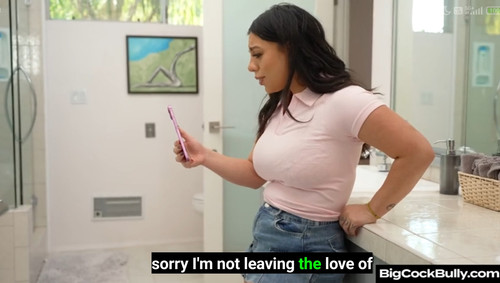
However, I realize now that this specific formatting (color tags) isn't compatible with your player and appears as broken text/tags. Since the community prefers a standard format, I am scrapping this design. I'm uploading a clean, plain SRT version right now without any styling or colors. Apologies for the inconvenience!"
Re: Request to increase subtitle upload size limit

Very good initiative, Youngboy, but a lot of players can't handle various things.
I'm on Android on a mobile, and my player can't handle VTT. It can take colours, but SRT can't give a background, so white on a black background cannot be programmed in and users would have to set their own preferences.
I tried doing the full file in one colour, then realised it is not up to me to decide which colour would suit a user, so I only use yellow for my initial line with my name in it. After that, the font colour reverts to whatever the user's default is.
A karaoke style colour change would be very distracting for me, so I would not use such a file.
I tried giving each speaker a different colour, but scrapped that too as distracting.
My suggestion: leave the choice of colour to each user. They can pick whatever their player and their eyes handle best.
Best
Alison
I'm on Android on a mobile, and my player can't handle VTT. It can take colours, but SRT can't give a background, so white on a black background cannot be programmed in and users would have to set their own preferences.
I tried doing the full file in one colour, then realised it is not up to me to decide which colour would suit a user, so I only use yellow for my initial line with my name in it. After that, the font colour reverts to whatever the user's default is.
A karaoke style colour change would be very distracting for me, so I would not use such a file.
I tried giving each speaker a different colour, but scrapped that too as distracting.
My suggestion: leave the choice of colour to each user. They can pick whatever their player and their eyes handle best.
Best
Alison
Re: Request to increase subtitle upload size limit

Hi,
To do effects on subtitles, it is better to use the format .ass like anime fansub do with Aegisub program.
So you can upload at the same time a .ass colorful subtitle and a simple .srt subtitle for compatibility.
To do effects on subtitles, it is better to use the format .ass like anime fansub do with Aegisub program.
So you can upload at the same time a .ass colorful subtitle and a simple .srt subtitle for compatibility.
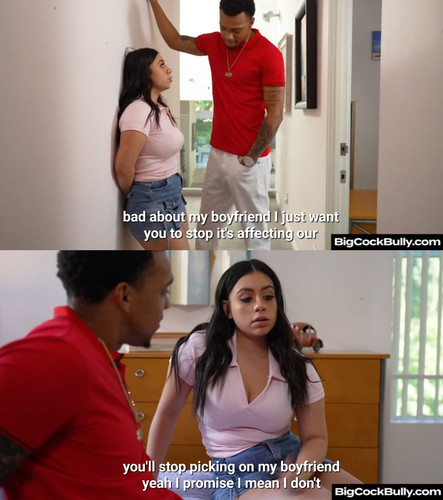
Fixed Version (No Colors, Standard SRT)
UPDATE: Clean Version (No Colors)
I have uploaded a new "Standard SRT" version based on the feedback.
This file has NO color tags and NO special formatting.
It should now display correctly on all TVs and players.
I hope you all like this version.
I have uploaded a new "Standard SRT" version based on the feedback.
This file has NO color tags and NO special formatting.
It should now display correctly on all TVs and players.
I hope you all like this version.
Re: Fixed Version (No Colors, Standard SRT)
Youngboy, SRT does accept basic formatting of bold, italics and underline.
I use italics within square brackets if the actor is thinking without speaking aloud. Bold and underline, for me, are a bit overwhelming as I find them distracting from the video.
I use italics within square brackets if the actor is thinking without speaking aloud. Bold and underline, for me, are a bit overwhelming as I find them distracting from the video.



