> Help
HowTo create a trailer for AVSubtitles


Re: HowTo create a trailer for AVSubtitles

I've downloaded some trailers from AdultTime but they are all over 90 seconds. Is this a strict limit? If so, should I crop out the titles and credits?
I'll be doing the trailers using Android tools. If they work, I'll upload a how to.
I'll be doing the trailers using Android tools. If they work, I'll upload a how to.
Re: HowTo create a trailer for AVSubtitles
Stupid question. I can't find where to upload trailers.:-(
Re: HowTo create a trailer for AVSubtitles
On the page of one of your subtitles, there's a button:
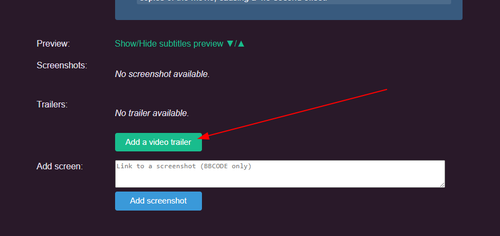
If your trailer length is more than 90 seconds, only the 90 first seconds will be kept.
Your file should be less than 10MB.
If your trailer length is more than 90 seconds, only the 90 first seconds will be kept.
Your file should be less than 10MB.
Re: HowTo create a trailer for AVSubtitles
In reply to truc1979:
As I am writing instructions on how to, please could you clarify.
Also, I just put up my first trailer. https://www.avsubtitles.com/movie52273/vanna-bardot-seth-gamble-2022-long-kiss-goodbye/subtitles/en/86975
Comments please? I used yellow (following Truc) and it seems a bit dull.
The vid was not very sharp. I uploaded at 640. Did you bring it down even more?
Thanks for hand holding.
Your file should be less than 10MB.When I upload, the instructions say file should be 20 Mb max.
As I am writing instructions on how to, please could you clarify.
Also, I just put up my first trailer. https://www.avsubtitles.com/movie52273/vanna-bardot-seth-gamble-2022-long-kiss-goodbye/subtitles/en/86975
Comments please? I used yellow (following Truc) and it seems a bit dull.
The vid was not very sharp. I uploaded at 640. Did you bring it down even more?
Thanks for hand holding.
Re: HowTo create a trailer for AVSubtitles
Oh, sorry. It's a typo, the real limit is 20MB.
I don't think the yellow looks dull. Just perfect for me, but it's my tastes :)
I like your trailer :)
And yes, unfortunately, I have to downgrade the video resolution (360:200 and a low bitrate). I do it in order to get a size close to 1MB per minute.
I don't think the yellow looks dull. Just perfect for me, but it's my tastes :)
I like your trailer :)
And yes, unfortunately, I have to downgrade the video resolution (360:200 and a low bitrate). I do it in order to get a size close to 1MB per minute.
Re: HowTo create a trailer for AVSubtitles

In reply to Alison:
[moaning]
[both moaning]
[panting]
and stuff like that.
But your trailer is really, really great for your first try. And if you cut it yourself: AWESOME!
*voice in the background* AND THE OSCAR FOR BEST EDITING IN A MOTION PICTURE GOES TO
!!! ALLY !!!
*crowd cheers, standing ovation*
FYI: I upload trailers with 720p and H.265 encoding. Has fewer artifacts, but not by much.
https://en.wikipedia.org/wiki/Compression_artifact
> Comments please? I used yellow (following
> Truc) and it seems a bit dull.
A tribute to Truc never hurts, but just use, what you like the most. I am lazy and just put the SRT file into MKV. Result: My trailers have big, white sentences burned in.
Also, I just put up my first trailer. https://www.avsubtitles.com/movie52273/vanna-bardot-seth-gamble-2022-long-kiss-goodbye/subtitles/en/86975Great trailer. 7 out of 10. I would give it a 10 out of 10 if you would add "[sighs]" at 2 seconds (you had a "[moan]" in there somewhere) and even thoug I like what you did mit "Yes, yes, yeesss" ... I would prefer some "Oh" and "Yesses" to convert into
[moaning]
[both moaning]
[panting]
and stuff like that.
But your trailer is really, really great for your first try. And if you cut it yourself: AWESOME!
*voice in the background* AND THE OSCAR FOR BEST EDITING IN A MOTION PICTURE GOES TO
!!! ALLY !!!
*crowd cheers, standing ovation*
FYI: I upload trailers with 720p and H.265 encoding. Has fewer artifacts, but not by much.
https://en.wikipedia.org/wiki/Compression_artifact
> Comments please? I used yellow (following
> Truc) and it seems a bit dull.
A tribute to Truc never hurts, but just use, what you like the most. I am lazy and just put the SRT file into MKV. Result: My trailers have big, white sentences burned in.
Re: HowTo create a trailer for AVSubtitles
Thanks for your comments. I used the same website that makes my profile webp images, as I found it has an "add text" button, which lets you add an SRT file. Painless.
Thanks for the 7. I'm dead chuffed with that. Will try for a ten next time.
No I didn't cut it myself. If there is an official trailer available, why not use that? Grab the trailer, throw it into Turboscribe, check, edit, add the subs to the video, done. Easy peasy. You think you're lazy?
Ezgif defaults to 640p, which is fine as it's downgraded to 320 anyway.
Just curious, where did you see a [moan] at 2 seconds? It was a sigh which I did not transcribe. And there is an error right after, as he said "they cancelled" but the sub says "I cancelled". Do I lose a mark for that?
Btw, I did not do these subs, they are one of Dopedoll's efforts which I never edit.
Thanks for the 7. I'm dead chuffed with that. Will try for a ten next time.
No I didn't cut it myself. If there is an official trailer available, why not use that? Grab the trailer, throw it into Turboscribe, check, edit, add the subs to the video, done. Easy peasy. You think you're lazy?
Ezgif defaults to 640p, which is fine as it's downgraded to 320 anyway.
Just curious, where did you see a [moan] at 2 seconds? It was a sigh which I did not transcribe. And there is an error right after, as he said "they cancelled" but the sub says "I cancelled". Do I lose a mark for that?
Btw, I did not do these subs, they are one of Dopedoll's efforts which I never edit.
Re: HowTo create a trailer for AVSubtitles
@Truc
Unlike subs where you can upload a revised version, trailers only allow you to add another, not update or replace one if there is an error. On my first one, there is a transcription error which is why I looked to see if it can be replaced.
It's not major and no one noticed it (yet). Just wondering if you'll at some stage give the same ability as in subtitles to replace a file.
Unlike subs where you can upload a revised version, trailers only allow you to add another, not update or replace one if there is an error. On my first one, there is a transcription error which is why I looked to see if it can be replaced.
It's not major and no one noticed it (yet). Just wondering if you'll at some stage give the same ability as in subtitles to replace a file.



